

The Complete 2026 Guide — Turn an Empty Profile Into a Recruiter Magnet
87% of recruiters now use LinkedIn to source candidates, and they form an opinion about your profile in roughly 6 seconds. If your photo is a cropped selfie, your headline just says ‘Student’ or ‘Looking for opportunities,’ and your experience section is empty, you’re being filtered out before you ever get a real chance — even when your actual background fits what they’re looking for. This guide walks through every section of your LinkedIn profile, with specific formulas and examples built for freshers who don’t have 10 years of experience to lean on.
Why This Actually Matters for Freshers Specifically
It’s tempting to assume LinkedIn optimization is for experienced professionals, not students — the data says the opposite. Profiles with a complete set of sections generate 71% higher interview rates, and a profile with 5 or more listed skills is roughly 27–31 times more likely to be discovered in recruiter searches. Since freshers can’t rely on years of work history to stand out, a well-built profile is often the single biggest lever available to you — it’s frequently the difference between being found by a recruiter searching for your exact skill set, and being invisible no matter how qualified you actually are.
Your Profile Photo: The Single Highest-Impact Change
LinkedIn’s own data shows profiles with a professional photo receive roughly 14–21 times more views, 9 times more connection requests, and up to 36 times more messages than profiles without one. Separately, 67% of recruiters say they won’t contact a candidate whose photo isn’t professional. This is the single highest-return change you can make to your profile, and it costs nothing — you don’t need a professional photographer.
- Use a smartphone near a window for natural daylight — avoid harsh indoor lighting or flash.
- Frame the shot from mid-chest up, with a plain, uncluttered background.
- Dress the way you would for an interview in your target field — smart casual works for most roles.
- Smile naturally and look directly at the camera; ask a friend to take it rather than using a mirror selfie.
Your Headline: The Most Searchable Line on Your Entire Profile
Your headline is the most important text on your profile because it’s the most heavily weighted field in LinkedIn’s search algorithm, and it follows you everywhere — search results, comments, connection requests, and messages. If you leave it blank, LinkedIn auto-generates something generic from your most recent role or education, which tells a recruiter nothing about your actual value. Crucially, only the first roughly 80 characters show in LinkedIn’s mobile preview card, so the terms you place earliest carry the most weight.
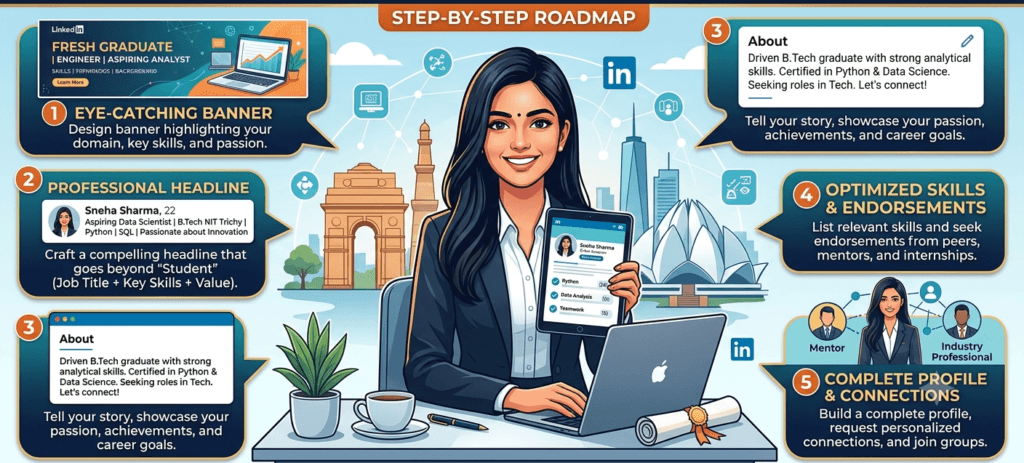
The Formula: Role + Specialty/Skills + Value You Offer
For freshers without a job title to lead with, structure your headline around your target role, your strongest skills, and what you can actually do — not vague adjectives like ‘passionate’ or ‘hardworking’ without context.
| Example — Engineering/CS student “Aspiring Software Developer | Java, React & DSA | Building Full-Stack Projects That Solve Real Problems” |
| Example — Commerce/Finance student “Finance Graduate | Financial Modelling, Excel & Equity Research | Seeking Analyst Roles in BFSI” |
| Example — Marketing/Mass Comm student “Digital Marketing Enthusiast | SEO, Content Strategy & Social Media Growth | Ex-Intern at [Company]” |
| Example — HR/Business student “HR & Talent Acquisition Graduate | Recruitment, Onboarding & Employee Engagement | MBA ‘26” |
Avoid keyword-stuffing your headline unnaturally — both recruiters and LinkedIn’s algorithm penalize text that reads like it was written for a machine rather than a person.
Your About Section: Where You Turn a Job List Into a Story
Most students either leave this section nearly empty or copy-paste their resume summary into it — both are missed opportunities. Recruiters specifically prioritise the About section to understand a candidate’s story beyond the bullet points, so treat it as your elevator pitch, not a formality.
A Simple Structure That Works
- Hook — open with a clear one-line statement of who you are and what you’re working toward, not a generic ‘I am a hardworking student.’
- Summarize what you do and who you help — even as a student, you can frame this around the type of problems you’re learning to solve.
- Weave in your key skills naturally, in sentence form rather than a bare list.
- Mention 1–2 specific achievements or projects with a measurable detail, if you have one — a number, a result, a scale.
- Close with a direct, inviting line — something like ‘Open to internship and entry-level opportunities in [field] — feel free to connect or reach out.’
| Example About section — fresher with one internship “Final-year Computer Science student passionate about building products that solve real problems, not just technical exercises. During my internship at [Company], I worked on a customer-facing feature used by over 500 daily users, which taught me how much user feedback shapes good engineering decisions. I’m comfortable with Java, React, and SQL, and I’m currently deepening my understanding of system design. Open to Software Engineering internship and full-time opportunities — always happy to connect with fellow developers or recruiters hiring for 2026 roles.” |
Experience Section: Even With No Formal Job, You Have More Than You Think
Your experience section should never be a copy-pasted job description — recruiters want to see what you actually did and what resulted from it, in your own words. As a fresher, this section isn’t limited to formal jobs: internships, significant college projects, freelance work, and leadership roles in student organisations all belong here if you can describe a real responsibility and outcome.
- Use action verbs and, where possible, a number — ‘Led a team of 5 to organise a college fest for 1,200+ attendees’ is far stronger than ‘Helped with college fest.’
- List academic projects with the same structure as work experience — what you built, what tools you used, what the outcome was.
- Don’t leave this section sparse just because you’re a student — an empty experience section is one of the most common reasons recruiters skip a profile entirely.
Skills, Certifications, and the Sections Most Students Skip
Skills
Add at least 10 relevant skills — profiles with 5 or more listed skills are dramatically more discoverable in recruiter searches, and LinkedIn lets you pin your top 3, which show up first on your profile. Choose skills that genuinely match the roles you’re targeting, not a generic list.
Certifications
Certifications from recognised platforms (Google, HubSpot, Coursera, or similar) signal that you’re learning outside the classroom, which matters more for freshers than for experienced hires who can point to work history instead. As of January 2026, LinkedIn has also introduced Verified AI Skills badges for AI-related competencies — worth pursuing if your field touches AI or data at all, since it’s a newer signal recruiters are starting to filter for specifically.
Featured Section
This section lets you pin a resume, a project portfolio, a certificate, or even a short video — and almost no student uses it. It’s a genuinely underused way to let a recruiter see your actual work in seconds, rather than requesting a resume separately.
Custom URL
Change your profile URL from the default (linkedin.com/in/yourname-a7b3c9d2) to a clean version (linkedin.com/in/yourname) under ‘Edit public profile & URL.’ It takes about 30 seconds, looks far more professional on a resume or email signature, and is a detail most candidates simply forget.
Settings Most Students Ignore — But Shouldn’t
| Quick wins that take under 5 minutes total • Turn on ‘Open to Work’ and set it to be visible to recruiters — this directly increases how often you surface in recruiter searches for your target roles. • Complete every section LinkedIn offers, even ones that feel optional — incomplete profiles are consistently ranked lower in search, regardless of how strong the filled sections are. • Set your custom URL, as covered above. • Add your location and target industry accurately — recruiters frequently filter search results by both. • Turn on notifications for relevant job alerts and recruiter InMail, so you don’t miss real opportunities buried in your inbox. |
Building Visibility: Why Activity Matters as Much as the Profile Itself
A perfectly optimized static profile still underperforms an active one. LinkedIn’s algorithm increasingly factors in activity signals — posts, comments, and genuine engagement — into how often your profile surfaces in search and how visible you are to your network. You don’t need to post constantly; even commenting thoughtfully on posts from people in your target field, or sharing a short reflection after completing a course or project, keeps your profile active and visible without requiring a content strategy.
- Comment genuinely on posts from professionals or companies you’re targeting, rather than generic ‘Great post!’ replies.
- Share a short post when you complete a certification, finish a project, or reach a milestone — this doubles as a portfolio update and an activity signal.
- Request recommendations from professors, internship supervisors, or team leads who can speak to specific work you did — social proof carries real weight with recruiters.
A Simple Weekend Action Plan
- Update your photo and banner image first — the single highest-impact change, and it takes 15 minutes.
- Rewrite your headline using the Role + Skills + Value formula covered above.
- Draft your About section using the 5-part structure — hook, summary, skills, achievement, invitation.
- Add or rewrite your experience entries with real detail and, where possible, a number.
- Add at least 10 skills and pin your top 3.
- Set your custom URL and turn on ‘Open to Work.’
- Send 5 genuine, personalised connection requests to people in your target field to start building real network activity.
Final Word
LinkedIn optimization isn’t about tricking an algorithm — it’s about making sure the recruiters already searching for someone with your exact skills can actually find you, and that what they see in those first 6 seconds gives you a real chance instead of an automatic pass. As a fresher, this is one of the few career-building steps that costs nothing but time, and unlike many of your competitors, most students still haven’t done it properly. A weekend spent fixing your profile can genuinely outperform weeks of cold applications.
READ NOW
Capgemini Hiring Process 2026 for Freshers – Eligibility, Assessment, Interview & Salary Guide
GCC Jobs in India 2026 for Freshers — Complete Guide (Salary, Top Companies & How to Get Hired)
Top 50 International Companies Hiring Remote Jobs in 2026 for India & APAC Region Read Now
Top 10 IT Companies Hiring Freshers in India 2026 — Salary, Process, Eligibility & Complete Guide
How to Write a Cover Letter for IT Jobs in India 2026 — With Templates
Salary After MBA in India 2026 — Top Companies, Roles & How Much You Really Earn
How to Answer ‘Tell Me About Yourself’ — Fresher Edition
Which Sectors Are Hiring the Most Freshers in India Right Now (2026)