

Here is a fact that changes how you should think about your job search in 2026: 87 percent of recruiters use LinkedIn as their primary tool for finding and screening candidates. Not Naukri. Not Indeed. Not job fairs. LinkedIn. When a recruiter at TCS, Infosys, Wipro, Accenture, or Cognizant opens a new fresher role, their first action is a LinkedIn search — and the results they see are ranked by an algorithm, not alphabetically.
If your LinkedIn profile is incomplete, poorly optimized, or missing key sections, you simply do not appear in those results — regardless of how strong your resume is or how many companies you have applied to. India now has over 120 million LinkedIn users, making it the second largest LinkedIn market in the world. The competition for recruiter attention is intense, and only profiles that are genuinely optimized appear at the top of recruiter search results.
This guide covers every section of your LinkedIn profile with the specific 2026 optimization strategy for each — the headline formula that gets you found, the About section structure that makes recruiters reach out, the skills strategy that places you 30 percent higher in search results, the new algorithm changes you need to know, and the weekly activity routine that keeps you visible even when you are not actively applying. Every tip is specific to Indian freshers targeting IT companies in 2026.
Why LinkedIn Matters More Than Any Other Job Portal for Freshers in 2026
| Metric | LinkedIn Data 2026 |
| Recruiters using LinkedIn as primary sourcing tool | 87% to 95% — across all major studies |
| India LinkedIn users | Over 120 million — second largest market globally |
| Profile views increase with professional photo | 21x more views vs no photo |
| Message increase with professional photo | 36x more messages from recruiters |
| Views increase with complete vs incomplete profile | 40x more searches for All-Star profiles |
| Skill assessment badges impact on recruiter search | 30% higher ranking in recruiter searches for that specific skill |
| Profiles with 5+ skills listed | 31x more InMail messages from recruiters |
| Skills endorsed 20+ times | Rank higher in recruiter search results |
| Connections at 500+ | Significantly expands recruiter search visibility — inflection point for algorithm reach |
| Profiles with 3+ recommendations | Treated as significantly more credible by both algorithm and recruiters |
| People hired through LinkedIn connections | 35.5 million confirmed — 122 million received interview invitations |
| LinkedIn algorithm change 2025-2026 | Activity now affects profile visibility in passive search — active profiles appear first even to recruiters not searching specifically for you |
The Key 2026 Change: LinkedIn’s algorithm now factors in your activity level when ranking profiles in recruiter searches. A perfectly optimized but dormant profile ranks lower than a slightly less polished but consistently active profile. This means posting, commenting, and engaging on LinkedIn directly improves how often you appear when recruiters search for candidates like you — even when you are not actively applying.
Step 1: Profile Photo — The Fastest 14x Multiplier
A strong profile photo can increase your LinkedIn profile views by 14 times versus no photo. This is the highest-impact single change you can make to your profile in 10 minutes. Recruiters spend approximately 6 seconds on each profile before deciding to read further — the photo is what creates the first impression in those 6 seconds.
| What to Do | What NOT to Do |
| Headshot only — shoulders and face filling 60-70% of the frame | Full-body photo where your face is a small dot in the distance |
| Plain, light-coloured background — white, light grey, light blue | Busy backgrounds — parties, travel photos, group photos cropped awkwardly |
| Professional or semi-professional attire — collared shirt minimum | Gym clothes, casual party wear, sunglasses |
| Natural, pleasant expression — slight smile at minimum | Stiff corporate grimace or overly casual grin |
| Well-lit — face visible clearly, no shadows across face | Dark, blurry, or low-resolution photos |
| Recent photo — within the last 1-2 years | School or college event photos from 5+ years ago |
| Solo photo — just you | Group photos where you are indistinguishable from others |
You do not need a professional photographer. A well-lit selfie in front of a plain wall, wearing a clean collared shirt, taken in good natural light with your phone, is genuinely sufficient for a fresher LinkedIn photo in 2026. The bar is professional appearance, not studio quality.
LinkedIn Background Banner
Your background banner is the wide image behind your profile photo. Most freshers leave this as the default blue gradient — which is fine but a missed opportunity. A custom banner that shows your technology focus (a subtle code editor background, a cloud infrastructure diagram, a simple text banner with your skills) signals intentionality and makes your profile visually distinct from the thousands of other freshers recruiters scroll through each day.
- Recommended size: 1584 x 396 pixels
- Free tool: Canva has LinkedIn banner templates — use a simple, text-based design in navy and white for a clean, professional look
- Content idea: Your target role + your top 2-3 skills in large, clean text on a dark background — e.g. ‘Software Engineer | Python | AWS | Open to SDE Roles’
Step 2: LinkedIn Headline — The Single Most Important Field for Recruiter Search
Your LinkedIn headline appears everywhere on the platform — search results, connection requests, comments you make on posts, InMail previews, and message thread headers. LinkedIn’s algorithm weights the headline field at approximately 5 times the weight of other profile fields when ranking search results. Getting your headline right is the highest-leverage optimization available to any fresher.
What LinkedIn Auto-Generates vs What Actually Works
DEFAULT HEADLINE (what LinkedIn auto-fills): ‘Student at XYZ Institute of Technology’ or ‘B.Tech Student | Looking for Opportunities’ — These appear on millions of identical profiles. They contain no searchable keywords. A recruiter searching for ‘Python Developer Fresher Bengaluru’ will never find you with this headline.
OPTIMIZED HEADLINE (what actually gets you found): ‘Software Engineer Fresher | Python | AWS Cloud Practitioner | Built JobMatch platform with React and Node.js | Open to SDE and GenAI roles | Bengaluru’ — This contains the exact terms recruiters search for: role title, specific skills, a credential, a project signal, and location.
The Fresher LinkedIn Headline Formula
LinkedIn allows 220 characters in the headline. Use as many as possible — research shows headlines with 100+ characters receive significantly more search impressions than shorter ones:
Formula: [Target Role] | [Hard Skill 1] | [Hard Skill 2] | [Certification or Project Signal] | Open to [Role Type] | [City]
Examples by target role:
- For SDE/IT roles: ‘Software Engineer Fresher | Python | AWS Cloud Practitioner Certified | Built full-stack job platform with React + Node.js | Open to SDE roles | Bengaluru’
- For Data Analyst roles: ‘Data Analyst Fresher | Python | SQL | Power BI | Google Data Analytics Certified | Open to BI and Analytics roles | Hyderabad’
- For Non-CS/ECE freshers: ‘ECE Graduate | Embedded Systems | C++ | IoT Project Portfolio | Open to Software Engineer and Hardware roles | Pune’
- For MBA/Management freshers: ‘MBA Marketing 2026 | Digital Marketing | Google Analytics Certified | HubSpot CRM | Open to Marketing and Product roles | Mumbai’
India-Specific Headline Tip: Include your city name in your headline. Recruiters at TCS, Infosys, Wipro, and Accenture often filter by city when searching for freshers to minimize relocation logistics. Bengaluru, Hyderabad, Pune, Chennai, and Noida are the most search-active cities. Including your city increases your visibility to relevant local recruiters by a significant margin.
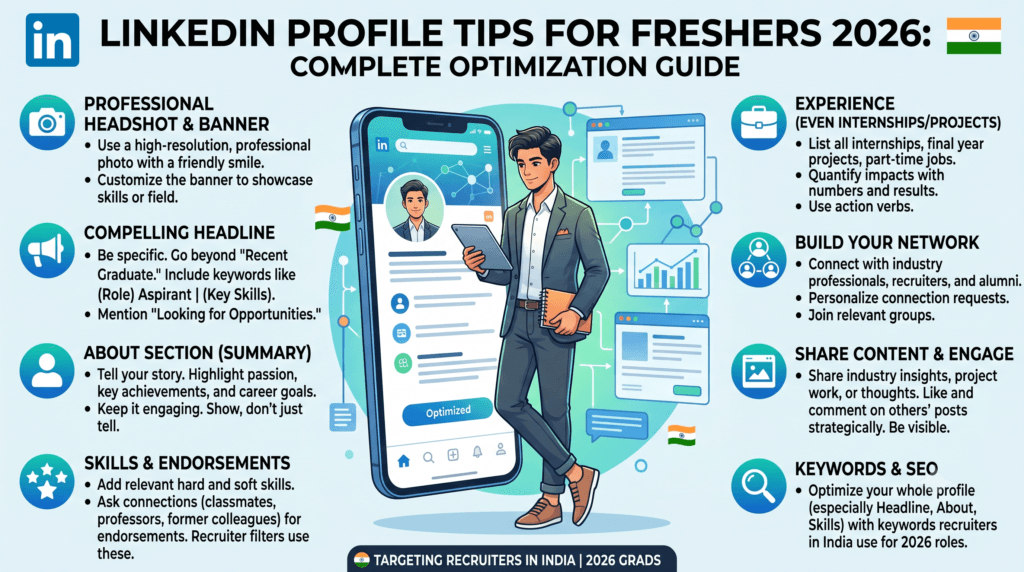
Step 3: About Section — The 1,500-Character Story That Makes Recruiters Reach Out
The About section is where your personality and genuine story can appear — unlike a resume, which is purely functional. LinkedIn allows up to 2,600 characters but shows only the first 300 before the ‘See more’ click. Your first 300 characters must hook the reader enough to click. Target 1,500 to 2,000 characters for the full section.
About Section Structure — 5 Paragraphs
| Paragraph | What to Write | Length |
| Opening Hook (shown before ‘See more’) | One strong sentence that immediately identifies what you are and what you bring. Must contain your target role and your strongest skill. Example: ‘I am a 2026 B.Tech CS graduate who has built and deployed 4 real-world projects using Python, React, and AWS — and I am actively looking for SDE and GenAI engineering roles in Bengaluru.’ | 2-3 sentences, 200-250 characters |
| What You Build / What You Know | Describe your technical skills and projects in paragraph form. What technologies do you work with daily? What problems do your projects solve? Embed keywords naturally here — ‘I build full-stack web applications using React.js on the frontend and Node.js with MongoDB on the backend…’ | 3-4 sentences |
| Your Strongest Project or Achievement | Describe your single strongest project in 2-3 sentences with specific numbers and impact. This is often more compelling than certification lists because it shows applied skill. | 2-3 sentences |
| What You Are Looking For | Be specific about the role you want, the type of work (product development, data engineering, cloud infrastructure), and whether you are open to relocating. Vague statements like ‘seeking challenging opportunities’ say nothing. | 2 sentences |
| Call to Action | Tell recruiters exactly what to do: ‘Connect with me on LinkedIn, reach out via the email in my contact section, or check my GitHub at github.com/yourname for live project demos.’ Make the next step obvious. | 1-2 sentences |
Write for humans first, algorithm second. LinkedIn’s algorithm can detect and penalise unnatural keyword stuffing. The goal is authentic language that happens to include the terms recruiters search for — not a paragraph that reads like a list of keywords forced into sentences.
Step 4: Skills Section — The Algorithm’s Primary Ranking Signal
Your LinkedIn skills section is the most direct way to influence how you appear in recruiter searches. LinkedIn’s algorithm weights skills heavily when ranking profiles — and the data is clear: profiles with 5 or more skills listed receive 31 times more InMail messages from recruiters than those with fewer skills.
Skills Strategy — 3 Rules for 2026
| Rule | What It Means | Action to Take |
| Rule 1: Pin your 3 strongest skills | LinkedIn displays your top 3 pinned skills most prominently — they appear near the top of your profile and carry the highest algorithmic weight in search ranking | Pin: your primary technical skill (Python / Java), your domain skill (Cloud / Data / Full-Stack), and one leadership or communication skill (Team Leadership / Problem Solving) |
| Rule 2: Complete LinkedIn Skill Assessments | Profiles with verified skill badges from LinkedIn’s own assessments rank 30% higher in recruiter searches for that skill | Take assessments for Python, Java, SQL, HTML/CSS, Git, and any other skill you are confident in. Failed assessments are private — only passes show on your profile. Retake after 3 months if you fail. |
| Rule 3: Aim for 10-20 relevant skills | More skills means more keyword matches in more recruiter searches. But quality matters — irrelevant skills dilute your profile relevance signal | Add every relevant technology, framework, tool, and soft skill you can genuinely discuss. Remove obviously outdated or irrelevant items like ‘MS Paint’ or ‘Microsoft Word’. |
Skills to Add by Target Role — 2026 India IT Market
| Target Role | Core Skills to Add | 2026-Specific Skills to Add |
| Software Engineer / SDE | Python, Java, Data Structures, Algorithms, SQL, Git, REST API, OOP, JavaScript | GenAI, LangChain, AWS, Docker, React.js, Node.js, Microservices |
| Data Analyst | Python, SQL, Excel, Power BI, Tableau, Statistics, Data Visualization | Google Analytics, Databricks, Snowflake, Machine Learning basics, Data Engineering |
| Cloud Engineer | AWS, Azure, Google Cloud, Linux, Networking, DevOps, Terraform basics | Cloud Security, Kubernetes, CI/CD Pipelines, Infrastructure as Code |
| Cybersecurity Analyst | Network Security, Python scripting, Linux, VAPT, SQL, Risk Assessment | Cloud Security, CEH, CompTIA Security+, SIEM tools, OWASP Top 10 |
| Digital Marketing | SEO, Google Analytics, Meta Ads, Content Marketing, Email Marketing, Canva | AI Marketing Tools, ChatGPT for marketing, HubSpot, Performance Marketing |
| HR / Management Fresher | Communication, Microsoft Excel, Recruitment, Stakeholder Management, HR Basics | HRIS Systems, LinkedIn Recruiter, Data Analysis, Employee Relations |
Endorsement Strategy: Ask 5 to 10 people who have worked with you — college project teammates, internship colleagues, professors — to endorse your top skills. LinkedIn’s algorithm considers endorsement count when ranking search results. A skill with 20+ endorsements outranks the same skill with 0 endorsements in recruiter search results, even when every other profile element is identical.
Step 5: Experience and Projects — How to Show What You Have Built
Freshers who have had internships should list them in the Experience section exactly as they would on a resume — company name, role title, dates, and 2-3 bullet points with action verbs and measurable outcomes. For freshers with no internship, use the Projects section that LinkedIn provides:
How to Add Projects on LinkedIn
- Go to your profile → Click ‘Add profile section’ → Select ‘Additional’ → Select ‘Projects’
- Project Name — use the exact name you use on GitHub
- Description — 3 to 4 sentences: what problem it solves, what tech stack it uses, what measurable outcome or scale it has
- Add the GitHub link or live demo URL in the project URL field
- Add skills associated with the project — this links the project to your skills section and strengthens both
Treat your LinkedIn Projects section with the same discipline as your resume projects. Each project description should include specific technologies, a quantified outcome, and a working link. A LinkedIn project entry without a GitHub link is significantly less compelling than one with a live, demonstrable codebase.
The Experience vs Projects Distinction on LinkedIn
| Section | What Goes Here | Key Tip |
| Experience | Any paid or unpaid internship, part-time work, freelance work, campus ambassador roles, research assistant positions | Include any internship regardless of duration — even 2 weeks. ‘Virtual Intern at Startup X | March 2025’ is better than nothing. |
| Projects | Academic projects, personal projects, open-source contributions, hackathon submissions — anything built, not earned | Add 3-5 projects maximum. Link every single one to GitHub or a live demo. Associate the skills used so they appear in your skills section. |
| Volunteer Experience | NSS, NCC, college fest committee leadership, NGO work | Shows initiative and leadership. Recruiters look at this more than most freshers realise — especially for management, HR, and consulting roles. |
Step 6: Education Section — Include CGPA and Relevant Coursework
LinkedIn’s Education section should match your resume exactly — same degree, same institution, same CGPA. Include:
- Degree and Branch: B.Tech Computer Science and Engineering — full name, not abbreviation
- Institution: Full official name — not abbreviations. ‘XYZ Institute of Technology, Pune’ not ‘XYZIT’
- Graduation Year: Include your expected or actual graduation year
- CGPA: Include if 7.0 or above. For IT companies, this is a searchable field that recruiters use to filter candidates.
- Activities and Societies: List any coding clubs, technical committees, event organising roles, or student chapters you participated in
- Description field: Add 2-3 relevant courses that align with your target role — ‘Relevant Coursework: Data Structures, Database Management Systems, Computer Networks, Machine Learning Fundamentals’
Also add your Class 12 education. LinkedIn allows multiple education entries. Recruiters at TCS, Infosys, and Wipro verify academic records as part of background checks — having your education section complete and accurate on LinkedIn reduces discrepancy risks.
Step 7: Featured Section — Pin Your Best Work at the Top
The Featured section appears near the top of your profile — directly below your About section and above Experience. It is the first thing a recruiter sees after reading your headline and About blurb. Most freshers leave this section empty. This is a significant missed opportunity.
| What to Pin in Featured Section | Why It Matters |
| Your strongest GitHub repository | Direct link to working code — a recruiter can click and see your actual project immediately. This is more powerful than any resume bullet. |
| Your highest-value certification (PDF or badge link) | Google Data Analytics certificate, AWS Cloud Practitioner badge, or Internshala Python certificate pinned here signals verified, credible skill proof. |
| A Wisdomland.in career guide post you found useful (if relevant) | Sharing and pinning industry-relevant content signals that you are engaged with your field, not just applying to jobs passively. |
| Your portfolio website (if you have one) | A personal portfolio site with your projects, resume, and contact information is the most complete professional statement a fresher can have in 2026. |
| A LinkedIn article or post you wrote about your learning | Pinning original content you created — even a short post about a technical concept you learned — signals intellectual curiosity and communication ability. |
Step 8: Certifications — The Searchable Credential That Filters You IN
Recruiters at TCS, Infosys, and startups specifically filter LinkedIn candidate searches by certification in 2026. Adding your certifications with the exact official names and issuing organizations means you appear in these filtered searches — candidates without certifications do not.
| Certification | Issuing Organization | Why It Matters for IT Jobs India 2026 |
| AWS Certified Cloud Practitioner | Amazon Web Services | Highly searched by GCC and cloud-native company recruiters — adds Rs. 1-4 LPA salary premium across multiple companies |
| Google Data Analytics Professional Certificate | Google — via Coursera | Google-branded certification with 150+ employer partners — directly searchable by name in recruiter filters |
| Google Cybersecurity Professional Certificate | Google — via Coursera | One of the most accessible cybersecurity entry credentials — recognized by IT companies and cybersecurity firms |
| TCS iON Career Edge — Young Professional | TCS iON | TCS’s own platform — appearing here signals familiarity with TCS systems and culture. Free. |
| HubSpot Content Marketing Certification | HubSpot Academy | For marketing and digital roles — free, recognized, and highly searchable |
| Microsoft Azure Fundamentals (AZ-900) | Microsoft | Cloud fundamentals credential — recognized by HCL, Cognizant, and BFSI GCCs specifically for Azure-deployed projects |
| Python Institute PCEP | Python Institute | Entry-level Python certification — verifiable external credential vs self-reported Python skill |
| CompTIA Security+ | CompTIA | Most globally recognized cybersecurity entry credential — searched by IT security teams at every major company on this list |
- Always use the complete official certification name — ‘AWS Certified Cloud Practitioner’ not ‘AWS cert’ or ‘Amazon cloud’
- Include the issuing organization — LinkedIn’s search engine recognizes ‘Amazon Web Services’ and ‘Google’ as credible issuers in ways that generic platform names do not
- Include the issue date and expiration date if applicable — expired certifications may still be listed but mark them as expired
Step 9: Open to Work Settings — How to Signal Availability Correctly
Enabling Open to Work is one of the most impactful settings changes a job-seeking fresher can make. But the settings matter — the wrong configuration limits who sees your availability signal:
| Setting | What It Does | Recommendation for Freshers |
| Open to Work — All LinkedIn Members | Shows the green ‘Open to Work’ frame on your profile photo — visible to everyone including your network | Use this if you are not currently employed and are actively searching — the visibility benefit outweighs any social awkwardness |
| Open to Work — Recruiters Only | Only shows to recruiter accounts (LinkedIn Recruiter subscribers) — not visible to your general network | Appropriate if you are employed and do not want your current employer to know you are searching — less relevant for freshers |
| Job Titles to Add | The role titles you are open to — these are used by LinkedIn’s algorithm to match you with recruiter searches | Add multiple specific titles: ‘Software Engineer’, ‘SDE’, ‘Backend Developer’, ‘Python Developer’, ‘Junior Developer’ — not just one generic title |
| Location Preferences | Cities and whether you are open to remote work | Add your home city + 3-4 major IT cities (Bengaluru, Hyderabad, Pune, Chennai) + toggle on Remote for maximum reach |
| Start Date | When you can start — ‘Immediately’ or ‘Within 3 months’ etc. | Choose ‘Immediately’ or ‘Within 1 month’ for active fresher job search — delays signal low urgency to recruiters |
Step 10: Connection Strategy — Reaching 500+ for Maximum Recruiter Visibility
The 500-connection threshold on LinkedIn is not just a vanity metric — it is the point at which your profile’s algorithmic reach expands significantly. LinkedIn’s search ranking gives higher visibility to profiles with larger, more relevant networks. At 500+ connections, recruiters who are searching for candidates like you are more likely to encounter your profile in search results.
Who to Connect With — Priority Order
- Batch mates and college colleagues — accept every relevant connection request from your college network. These are your most natural first-degree connections.
- Professors and faculty — especially those who know your work. A recommendation from a professor is among the strongest credentials a fresher can have.
- Internship colleagues and managers — if you have done any internship, connect with everyone you worked with immediately. A former internship manager’s recommendation is gold.
- Alumni from your college working at target companies — search ‘TCS’ + ‘XYZ Institute of Technology’ on LinkedIn. Find alumni at your target companies and send a personalized connection note.
- Recruiters at your target companies — search ‘Recruiter’ + ‘TCS’ or ‘HR’ + ‘Infosys’ on LinkedIn. Send a short, professional connection request: ‘Hi [Name], I am a 2026 B.Tech CS fresher actively looking for SDE roles. I would love to connect and stay updated on TCS opportunities.’
- Technical professionals in your field — authors of posts you have genuinely found useful, speakers from college tech fests, and engineers at companies you admire are all worth connecting with
Connection Request Message Template
For recruiters at target companies: ‘Hi [Name], I am a 2026 B.Tech CSE fresher with Python, AWS, and React.js skills, actively looking for SDE and GenAI roles in Bengaluru. I noticed you work at [Company] and would love to connect. Thank you.’
Keep connection messages under 300 characters — LinkedIn’s connection request character limit is 300 and shorter messages have higher acceptance rates. Be specific (your degree, your skills, your city) and genuine (mention something specific about why you are connecting with that person or company).
Step 11: Weekly Activity Routine — How Activity Affects Recruiter Visibility in 2026
LinkedIn’s 2025-2026 algorithm change is significant for job seekers: activity now affects profile visibility in passive recruiter search. Recruiters searching for candidates see more active profiles first — even when they are not explicitly filtering by activity. A perfectly optimized but dormant profile ranks lower than a slightly less polished but consistently active one.
You do not need to become a LinkedIn influencer. Short, genuine posts under 150 words get strong engagement on LinkedIn India in 2026. What matters is consistency, not volume:
| Activity | Frequency | Why It Helps | What to Post / Comment |
| Post original content | Once per week minimum | Posts generate profile visits from your network — every person who reads and engages with your post may become a connection who knows a recruiter | Share one thing you learned this week — a coding trick, a career tip, a project update, a thought on a technology trend |
| Comment on industry posts | 3-5 times per week | Commenting on posts from people at your target companies gets noticed — the author and their network see your name and profile | Comment something genuinely useful on posts by TCS, Infosys, Wipro, HCL, or Accenture official pages. 2-3 sentences minimum — not just ‘Great post!’ |
| Like and share relevant content | Daily — 5-10 items | Engagement signals to the algorithm that your profile is active | Like posts from people in your target companies and field — tech news, career advice, company announcements |
| Respond to connection requests and messages | Within 24 hours | Fast response rates signal to LinkedIn’s algorithm that you are an engaged user | Always accept relevant connection requests. Always respond to recruiter InMails — even if to politely decline or request more information |
| Update your profile | After every certification, project completion, or significant achievement | Profile updates trigger a notification to your connections — ‘X completed a new certification’ — generating organic profile visits | Add certifications as you complete them. Update the About section when you finish a major project. |
Content Idea for Freshers Who Don’t Know What to Post: Share your learning journey. ‘Today I completed the AWS Cloud Practitioner exam — here are 3 things I learned about cloud architecture that I didn’t expect.’ This type of post is: genuine (you are sharing real experience), educational (others in your network benefit), and a visible credential signal (you just told 500 people that you have an AWS certification without seeming like you are bragging).
LinkedIn Optimization for Specific IT Companies — TCS, Infosys, Wipro, Accenture, Cognizant, HCL
Each major IT company’s recruiters use LinkedIn slightly differently. Here is what works specifically for each:
| Company | LinkedIn Strategy That Works Specifically Here |
| TCS | Follow TCS and TCS iON official pages. TCS recruiters specifically search for ‘NQT’, ‘TCS iON’, and technology skills listed in the TCS Digital and Prime JDs. Add ‘TCS NQT’ as a certification if you have appeared. Connect with TCS campus recruiters by searching ‘TCS Recruiter Campus’. |
| Infosys | Add ‘InfyTQ Foundation’ or ‘InfyTQ Master’ certification to your LinkedIn Certifications section with Infosys as the issuer. Infosys recruiters search specifically for InfyTQ certified candidates when opening SP and DSE roles. Follow Infosys official page and engage with their posts. |
| Wipro | Follow Wipro careers page. Add WILP or Elite NTH in your education/certifications if applicable. Wipro recruiters search for essay-writing and communication skills signals — your About section and post quality matter more here than at other companies. |
| Accenture | Follow Accenture India official page. Add GenAI-related skills and projects prominently — Accenture’s 2026 hiring explicitly targets GenAI experience. Accenture recruiters also search for ‘AMCAT’, ‘ASE’, and ‘Accenture’ in profiles of candidates who have appeared in previous processes. |
| Cognizant | Add Salesforce, SAP, PEGA or ServiceNow certification if you have one — Cognizant GenC Pro recruiters specifically filter for these. Follow GenC official page. Cognizant campus recruiters search for ‘GenC’ and ‘Cognizant campus’ in candidate profiles. |
| HCL Technologies | Follow HCL Tech careers page. Add ‘HCL TechBee’ or ‘HCL AMP’ if applicable. HCL recruiters in 2026 specifically search for GenAI, cloud, and cybersecurity — ensure these appear in your headline and skills if relevant to your profile. |
30-Day LinkedIn Optimization Plan for Indian Freshers
Week 1 — Foundation (Days 1-7)
- Day 1: Update profile photo (professional, well-lit headshot) and create a custom banner on Canva
- Day 2: Rewrite your headline using the formula above — include target role, 2 skills, certification, city
- Day 3: Write your About section — 5 paragraphs, 1,500 to 2,000 characters, with a call to action at the end
- Day 4: Update Education section — add CGPA, relevant coursework, activities and societies
- Day 5: Update Skills section — add 15 to 20 relevant skills, pin top 3, take 3 LinkedIn skill assessments
- Day 6: Add all Certifications with full names and issuing organizations
- Day 7: Add all Projects with GitHub links and skill associations. Set up Featured section.
Week 2 — Connections and Visibility (Days 8-14)
- Day 8: Enable Open to Work with ‘All LinkedIn Members’ setting. Add 5 target job titles and preferred cities.
- Day 9: Send connection requests to 20 batch mates and college friends — personalize each request
- Day 10: Search for and connect with alumni from your college at your 3 target companies
- Day 11: Follow the official LinkedIn pages of TCS, Infosys, Wipro, Accenture, Cognizant, and HCL
- Day 12: Search for ‘Recruiter’ at each target company and send 5 connection requests with the template above
- Day 13: Customize your LinkedIn URL — Settings → Edit public profile URL → set to linkedin.com/in/FirstnameLastname
- Day 14: Write and post your first LinkedIn post — 100 to 150 words on something you learned recently
Week 3-4 — Activity and Engagement (Days 15-30)
- Post once per week — share a project update, a certification completion, a career tip, or a technical insight
- Comment on 3 to 5 posts daily — industry news, company pages, professionals in your field
- Complete 2 to 3 more LinkedIn Skill Assessments — focus on skills with the green badge that appear in target JDs
- Ask 3 people (professor, internship colleague, project teammate) for LinkedIn Recommendations
- Check LinkedIn notifications daily — respond to connection requests and messages within 24 hours
- Apply to 5 to 10 relevant roles directly through LinkedIn — ‘Easy Apply’ for speed, company site for personalization
8 LinkedIn Profile Mistakes Freshers Make in India 2026
| Mistake | Why It Costs You Opportunities | Fix It In |
| Default headline (‘Student at XYZ College’) | Contains no searchable keywords — you are invisible in recruiter searches for any specific role | 10 minutes — use the formula in Step 2 above |
| No profile photo | Profiles without photos get 14x fewer views — recruiters skip blank-photo profiles reflexively | 15 minutes — a well-lit phone selfie against a plain wall is sufficient |
| Empty Featured section | Misses the highest-visibility section on the profile — the first thing a recruiter sees after your headline | 20 minutes — pin your GitHub, top certification, or a post you wrote |
| Skills section with fewer than 5 skills | Profiles with 5+ skills receive 31x more InMail messages — below this threshold your profile is significantly underperforming | 10 minutes — add every relevant technology and tool you can discuss |
| No LinkedIn skill assessments | Missing the 30% search ranking boost that verified skill badges provide | 30 minutes per assessment — take 3 this week for your strongest skills |
| Posting nothing ever | Dormant profiles rank lower in recruiter searches since the 2025-2026 algorithm change that weights activity | Post once per week — even 100 words on something you learned |
| Generic connection requests with no message | No-message requests have much lower acceptance rates — especially from recruiters | Add a 2-sentence personalized note to every connection request to professionals and recruiters |
| Not customizing LinkedIn URL | Default URL like linkedin.com/in/yourname-9b7c4f2d looks unprofessional and is hard to share on your resume | 5 minutes — Settings → Public profile → Edit URL → set to FirstnameLastname |
Frequently Asked Questions
How many connections should a fresher have on LinkedIn in 2026?
The 500-connection threshold is the most important milestone — it is the point at which your profile’s algorithmic reach expands significantly and you are treated as a credible networked professional by LinkedIn’s search ranking system. Below 500, LinkedIn displays ‘X connections’ as a specific number. At 500+, it displays ‘500+ connections’, which signals credibility to both the algorithm and human visitors. Focus on reaching 500 genuine connections — batch mates, college faculty, internship colleagues, alumni at target companies, and professionals in your field — before worrying about any other LinkedIn metric.
Should I pay for LinkedIn Premium as a fresher job seeker in India?
For active job seekers (applying to 10+ companies per week), LinkedIn Premium Career at approximately Rs. 2,800 to Rs. 3,400 per month is worth a 2 to 3-month investment. The key benefits are InMail credits (message any recruiter directly, even without being connected), seeing who viewed your profile (lets you follow up with recruiters who visited), and the ‘Featured Applicant’ badge that increases your visibility when applying through LinkedIn. Cancel after landing your first role. For passive profile-building purposes, the free tier is sufficient. The three most impactful profile optimizations — headline, About section, and skills — are fully available on the free tier.
What should a fresher write in the LinkedIn About section?
Write 5 short paragraphs totaling 1,500 to 2,000 characters: a hook sentence that identifies your degree and strongest skill, a description of what you build or know technically, your single strongest project with specific numbers, what you are looking for (specific role type and location), and a clear call to action telling recruiters exactly how to reach you. Write for humans first — the goal is a recruiter reading your About section and understanding exactly who you are, what you can do, and what you want within 30 seconds. Avoid generic phrases like ‘passionate’, ‘dedicated’, and ‘seeking challenging opportunities’ — every second profile uses these exact words.
How often should a fresher post on LinkedIn to improve visibility?
Once per week minimum is sufficient to stay active in LinkedIn’s 2026 algorithm. Posting more than once per day is counterproductive — LinkedIn’s algorithm shows your posts to your network progressively, and posting too frequently competes with your own earlier posts. The most effective content for Indian freshers is: a learning update (completed a certification, finished a project, solved a difficult coding problem), a career tip relevant to your field, a short thought on a technology trend, or a question that invites your network to comment. Posts under 150 words consistently perform well on LinkedIn India in 2026 — long essays are less necessary than many guides suggest.
How can a fresher get LinkedIn recommendations without any work experience?
Recommendations from three sources are accessible to freshers without formal work experience: college professors who supervised your final-year project or dissertation (ask specifically to mention the project, the skills demonstrated, and one personal quality), internship managers or colleagues even from short-duration internships, and senior batch mates who worked with you on significant college projects. Send a specific request with a template — do not just ask generically. Say: ‘Could you write a brief recommendation that mentions the [project name] we worked on, the [specific technology] we used, and [one specific quality you observed]?’ Making the recommendation easy to write significantly increases the likelihood of receiving one.
Does LinkedIn show who viewed my profile? And should I view a recruiter’s profile?
LinkedIn shows profile viewers to the person whose profile was viewed — unless you browse in private mode (Settings → Privacy → Profile viewing options → Private mode). Viewing a recruiter’s profile publicly means they see that ‘Software Engineer Fresher from Pune viewed your profile’ — which can actually initiate outreach from the recruiter. For active job seekers, leaving your profile viewing in public mode is recommended. Private mode hides you from viewers’ notifications but also means you cannot see who viewed your own profile, which removes the ability to follow up with recruiters who visited you.
Should I add my 10th and 12th marks on LinkedIn?
For fresher profiles targeting IT companies, yes — include both. Indian IT companies including TCS, Infosys, Wipro, HCL, and Cognizant all have minimum academic eligibility thresholds at the 10th, 12th, and graduation level. Having your complete academic record on LinkedIn creates alignment between your LinkedIn profile and the information you provide on their application portals, which reduces discrepancy flags during background verification. Add both academic levels in the Education section with the school/college name, board, year, and percentage. This is standard practice for Indian fresher profiles and is expected by campus recruiters at all major IT companies.
Final Thoughts — Your LinkedIn Profile Is a Living Asset, Not a One-Time Task
A LinkedIn profile is not a document you fill in once and forget. In 2026, it is an active, algorithmic asset that ranks you in recruiter searches, generates inbound interest from companies, and compounds your visibility over time with every connection, post, and engagement. The freshers who treat LinkedIn as a living document — updating it with every certification, posting once a week, and building genuine connections systematically — are the ones who receive recruiter InMails before they have even submitted a formal application.
Start today with the 30-day plan in this guide. The first week requires the most effort — photo, headline, About section, skills, certifications, projects. After that, maintaining your LinkedIn takes 20 to 30 minutes per week. The compounding effect of a genuinely optimized, consistently active LinkedIn profile over 6 months is one of the most underestimated career assets available to Indian freshers right now.
Once your LinkedIn is ready, apply through it directly to TCS, Infosys, Wipro, Accenture, Cognizant, and HCL — all of which have LinkedIn Easy Apply or direct application links on their company pages. A strong LinkedIn profile combined with a strong resume creates the best possible first impression — and in a market with over 120 million Indian LinkedIn users, the quality of that impression determines everything that follows.
READ NOTE
Capgemini Hiring Process 2026 for Freshers – Eligibility, Assessment, Interview & Salary Guide
GCC Jobs in India 2026 for Freshers — Complete Guide (Salary, Top Companies & How to Get Hired)
Top 50 International Companies Hiring Remote Jobs in 2026 for India & APAC Region Read Now
Top 10 IT Companies Hiring Freshers in India 2026 — Salary, Process, Eligibility & Complete Guide