
Here is the uncomfortable truth about your resume: most Indian freshers are losing job opportunities before any human ever sees their application. Companies like TCS, Infosys, Wipro, Accenture, and Cognizant all use Applicant Tracking Systems — ATS software — that automatically scans and filters resumes before a recruiter opens a single file. If your resume fails the ATS filter, it gets rejected silently and permanently.
The problem is not your skills or your CGPA. The problem is that most fresher resumes in India in 2026 are built on 1990s-era formats — two-column layouts that ATS cannot read, career objective lines that say nothing, declarations that waste space, and photographs that introduce bias. These mistakes are entirely fixable in one afternoon.
This guide tells you exactly what to include, what to delete, how to format every section, what to write in your projects, which keywords TCS, Infosys, Wipro, and Accenture are looking for, and which free tools to use to build and check your resume. By the end, you will have a concrete, actionable checklist and the confidence to submit a resume that actually gets read.
What Is ATS and Why Does It Matter for Your Resume in 2026?
ATS stands for Applicant Tracking System. It is software that every major Indian IT company — TCS, Infosys, Wipro, HCL, Cognizant, Accenture — uses to automatically process the hundreds and thousands of resumes they receive for every job opening. The ATS reads your resume, extracts information into structured fields, scores it against the job description, and decides whether a human recruiter ever sees it.
In 2026, approximately 90 percent of mid-to-large Indian companies use ATS as the first filter for applications. Naukri.com’s ATS gives higher scores to clean, single-page PDFs. LinkedIn uses its own parsing system. Company-specific portals like nextstep.tcs.com and careers.infosys.com have their own ATS configurations.
| What ATS Does | What Fails ATS | What Passes ATS |
| Reads resume text top to bottom, left to right | Two-column or sidebar layouts — text gets scrambled during parsing | Single-column layout only |
| Extracts name, email, phone, skills, education | Tables, text boxes, graphics, logos — ATS cannot read these | Plain text paragraphs and simple bullet points |
| Scores resume against job description keywords | Unusual section headings like ‘My Journey’ or ‘Core Competencies Arsenal’ | Standard headings: Education, Skills, Projects, Experience |
| Filters candidates before any human review | PDFs created from design tools like Canva multi-column templates | Word documents or simple single-column PDF exports |
| Checks for required qualifications | Skill keywords buried in paragraphs rather than clearly listed | Dedicated Skills section with listed keywords |
The Single Biggest ATS Mistake: Two-column resume templates — the kind most freshers download from Canva or design sites — look beautiful to a human eye but are disastrous for ATS. The parser reads left-to-right across both columns simultaneously, mixing your skills with your education dates and scrambling everything. Single-column format is non-negotiable for ATS compliance.
What to DELETE From Your Fresher Resume in 2026 — The Outdated List
This is the section most guides miss. Before you think about what to add, delete everything on this list. Every item wastes prime resume space, looks unprofessional to modern recruiters, and adds zero value to ATS scoring:
| What to Delete | Why It Hurts You | What to Replace It With |
| Photograph / Passport-size photo | Causes ATS parsing errors. Introduces unconscious bias. Wastes space. Not required by any major IT company in India. | Nothing — leave that space for a stronger project bullet |
| Date of Birth | Creates potential age discrimination. Not relevant to job performance. Never legally required for private sector IT jobs. | Nothing — delete entirely |
| Father’s Name / Mother’s Name | Personal information not relevant to professional hiring. A 1970s government job relic still appearing in 2026 resumes. | Nothing — delete entirely |
| Religion / Caste | Illegal basis for hiring decisions. Listing it signals unfamiliarity with modern professional norms. | Nothing — delete entirely |
| Marital Status | Irrelevant and potentially discriminatory. No IT recruiter needs this information. | Nothing — delete entirely |
| Gender | Not required. ATS does not use it for filtering. | Nothing — delete entirely |
| Career Objective (generic version) | ‘Seeking a challenging position in a dynamic organisation where I can grow’ — appears on millions of identical resumes and signals nothing | One-line Professional Headline: Role + 2 hard skills + 1 quantified achievement |
| Declaration: ‘I hereby declare…’ | Complete waste of space for private IT companies. Recruiters know you are not lying. This section is from government job forms. | Only include for actual government job applications that require it. Delete for all IT company applications. |
| ‘References available upon request’ | Unnecessary. Recruiters know they can ask. Never included in modern resumes. | Nothing — delete entirely |
| Hobbies: ‘listening to music, watching movies, playing cricket’ | ‘Listening to music’ appears on 80% of all fresher resumes. It signals nothing to a recruiter. | Delete generic hobbies. Only include if genuinely relevant — e.g. ‘Competitive chess player (state-level)’ signals analytical thinking |
| MS Office Proficiency as a skill | In 2026, MS Office is assumed for any graduate. Listing it is equivalent to listing ‘can use a smartphone’ | Replace with specific tools you actually use: Advanced Excel with VLOOKUP and pivot tables, Power BI, Python, SQL |
| Full home address | City name is sufficient. Full street address wastes space and creates privacy risks. | City, State only — e.g. ‘Pune, Maharashtra’ |
| 10th and 12th marks for experienced candidates | For freshers — include both since IT companies require them for eligibility. For anyone with 2+ years of work experience — delete and use the space for achievements. | Keep for fresher applications to IT companies since TCS, Infosys, Wipro all verify academic records |
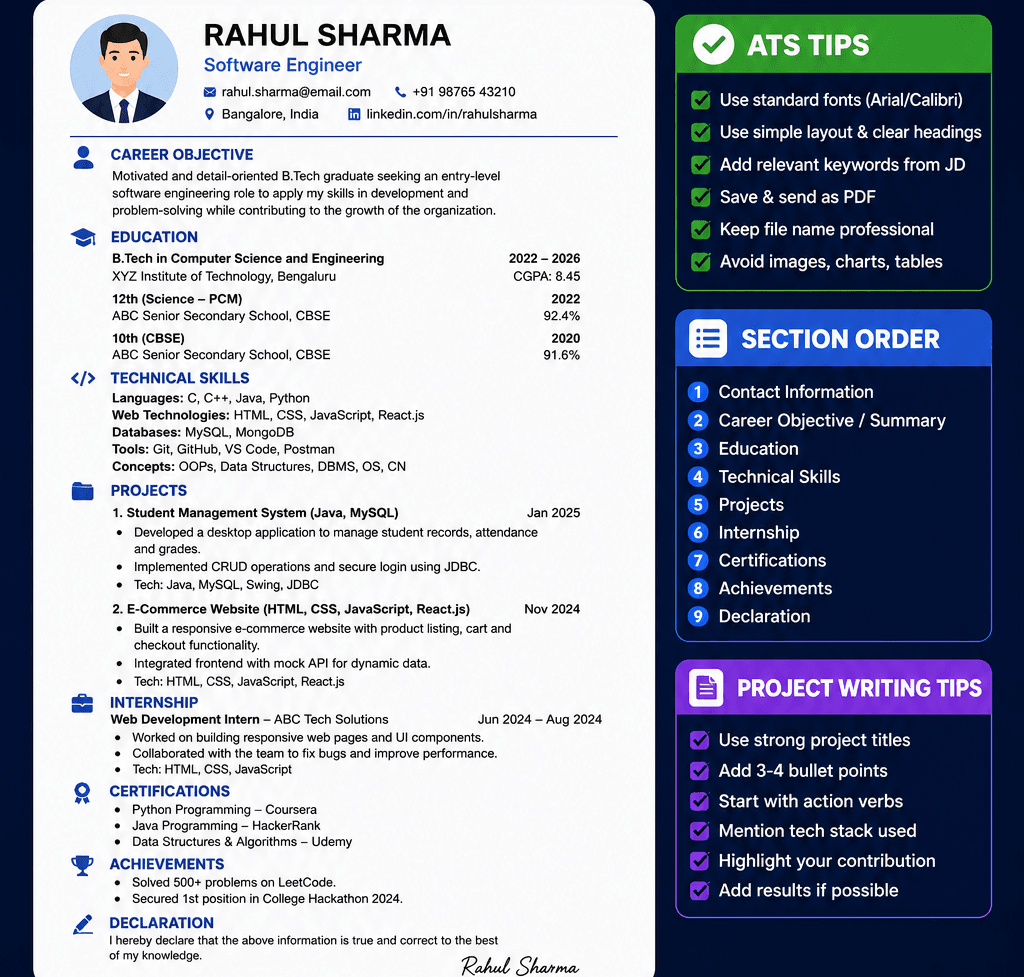
The Correct Fresher Resume Format for India 2026 — Section by Section
Here is the exact structure that passes ATS, satisfies Indian IT company requirements, and reads clearly in 6 seconds to a human recruiter:
| Section Order | Section Name | What Goes Here |
| 1 | Contact Information | Full name (large, bold) | Phone number | Professional email | City, State | LinkedIn URL | GitHub URL (for IT roles) |
| 2 | Professional Headline / Summary | One to two lines: your degree + 2 hard skills + 1 quantified achievement or project outcome |
| 3 | Education | Degree, Branch, College Name, Year of Passing, CGPA — for all levels (10th, 12th, UG) since IT companies require all three |
| 4 | Technical Skills | Grouped by category: Languages, Frameworks, Databases, Tools, Cloud — list every relevant technology you can discuss in an interview |
| 5 | Projects | 2 to 4 projects maximum — each with: Project Name | Technologies | GitHub/live link | 2-3 bullet points with quantified outcomes |
| 6 | Internships / Work Experience | Include any internship — even if unpaid or short. Action verb + what you did + technology used + outcome or scale |
| 7 | Certifications | Full certification name | Issuing platform | Year — e.g. AWS Cloud Practitioner | Amazon Web Services | 2026 |
| 8 | Achievements / Extracurriculars | Only genuinely impressive items — hackathon wins, coding competition ranks, leadership positions, relevant competitions |
| 9 | Declaration (optional) | Only for government job applications. Delete for all private IT company applications. |
One Page — No Exceptions: Indian recruiters shortlist 200 to 500 resumes per role and spend an average of 6 to 8 seconds on each one. A two-page fresher resume signals poor prioritisation skills. If your resume is spilling to a second page, reduce font size to 10.5pt, tighten margins to 0.6 inches, and cut generic content — not your strongest projects.
Formatting Specifications — The Exact Settings
| Setting | Correct Value | Why |
| Font | Arial, Calibri, or Georgia — 10 to 11pt for body, 12pt for headings | Standard fonts parse correctly in all ATS systems. Comic Sans, decorative fonts, and downloaded fonts often fail to parse. |
| Layout | Single-column only | Two-column and sidebar layouts scramble in ATS parsing |
| Margins | 0.6 to 1 inch on all sides | Under 0.5 inch looks cramped to human reviewers. Over 1.2 inches wastes space on a one-page resume. |
| File Format | PDF saved from Word or Google Docs | Native PDF exports from design tools often have text embedded as images. Save as PDF from a text editor for ATS safety. |
| Line Spacing | 1.0 to 1.15 — no double spacing | Double spacing pushes content to page 2 unnecessarily |
| Bullet Points | Simple round bullets only | Custom bullet symbols (arrows, diamonds, checkmarks) may not render correctly in all ATS systems |
| Section Headings | Bold, slightly larger than body text (12 to 13pt) — all caps or title case | Standard casing is more ATS-safe than all-caps, but both generally work |
| Colour | Black text, white background only | Coloured text or backgrounds can cause ATS parsing errors and look unprofessional in print |
How to Write Each Section — With Examples
Section 1: Contact Information
Your name should be the largest text on the page — 14 to 16pt, bold. Everything else in the contact section should be 10 to 11pt. Here is the correct format:
ARJUN SHARMA +91 98765 43210 | arjun.sharma@gmail.com | Bengaluru, Karnataka linkedin.com/in/arjunsharma | github.com/arjunsharma
- Use a professional email — firstname.lastname@gmail.com — not coolboy123@gmail.com or pet nicknames
- Missing LinkedIn URL is a red flag for tech roles in 2026 — always include it even if your profile is basic
- Include your GitHub URL for any IT role. A GitHub link with 3+ repositories signals practical skills better than any certificate
- City and State only — no street address, no PIN code, no landmark
Section 2: Professional Headline
Replace the generic career objective with a one-line Professional Headline. This is the highest-value change most freshers can make to their resume in 10 minutes:
REMOVE THIS: ‘Career Objective: To obtain a challenging position in a reputed organization where I can utilize my skills and contribute to organizational growth.’ — This appears on millions of identical resumes and says nothing specific about you.
REPLACE WITH THIS: ‘B.Tech CS 2026 | Python | AWS Cloud Practitioner | Built a RAG chatbot using LangChain and deployed on GitHub with 200+ stars.’ — This immediately tells the recruiter your degree, your strongest skills, and one concrete achievement. In 6 seconds, this is what gets you shortlisted.
Formula: [Degree + Branch + Graduation Year] | [Hard Skill 1] | [Hard Skill 2] | [Quantified project achievement or certification]
Section 3: Education
For IT company applications (TCS, Infosys, Wipro, HCL, Cognizant, Accenture), include all three academic levels because all six companies verify academic records and have minimum CGPA thresholds at each level:
| Degree | Institution | Year | Score |
| B.Tech — Computer Science Engineering | XYZ Institute of Technology, Pune | 2026 | 8.2 CGPA |
| Class 12 (CBSE / Maharashtra State Board) | ABC Junior College, Pune | 2022 | 87.6% |
| Class 10 (CBSE / Maharashtra State Board) | PQR High School, Pune | 2020 | 91.2% |
- Include CGPA if it is 7.0 or above — it strengthens your profile
- If CGPA is between 6.0 and 6.9, include it since IT companies require it for eligibility verification — do not hide it or it raises flags at background check
- If CGPA is below 6.0, include it — hiding it is considered misrepresentation and leads to offer revocation after background verification
- Relevant coursework can be added under graduation if it matches the job description — e.g. ‘Relevant Coursework: Data Structures, Database Management, Computer Networks’
Section 4: Technical Skills
This is your primary ATS keyword section. List every relevant skill you can genuinely discuss in an interview, grouped by category. Never list something you cannot explain:
Languages: Python, Java, JavaScript, SQL Frameworks: React.js, Node.js, Spring Boot Databases: MySQL, MongoDB, PostgreSQL Cloud: AWS (EC2, S3, Lambda basics) — Cloud Practitioner Certified Tools: Git, GitHub, VS Code, Postman, Docker basics
- Only list skills you can speak to in an interview. Listing ‘Machine Learning’ when you watched 3 YouTube videos is a red flag that experienced interviewers always catch.
- Add ‘basics’ or ‘fundamentals’ qualifier for skills you know at a beginner level — this is honest and still shows exposure
- Specific tool and technology names score better in ATS than generic descriptions — ‘MySQL’ beats ‘databases’, ‘React.js’ beats ‘frontend frameworks’
Section 5: Projects — The Most Important Section for Freshers
For freshers, projects replace work experience. This section is where recruiters decide whether to call you. Most fresher projects are written so vaguely that they convey nothing — here is the formula that works:
Format: Project Name (Technologies Used) | GitHub Link or Live URL
Then: 2 to 3 bullet points following this structure:
- Action Verb + What You Built + Technology Stack + Scale or Scope
- Action Verb + Specific Problem Solved + Measurable Outcome
BAD EXAMPLE: ‘E-commerce website project using HTML, CSS, JavaScript and PHP. Implemented various features for users.’ — This says nothing specific. Every third fresher has a line exactly like this. It gets ignored.
GOOD EXAMPLE: JobMatch Platform (React.js, Node.js, MongoDB) | github.com/yourname/jobmatch – Built a job aggregation platform that scrapes 5 job boards and displays 2,000+ live listings with real-time filtering by role, city, and company – Implemented JWT authentication and reduced dummy sign-ups by 80% in testing; deployed on AWS EC2 with CI/CD pipeline via GitHub Actions
The difference: the good example includes specific numbers (2,000+ listings, 80% reduction, 5 job boards), specific technologies (React.js, Node.js, MongoDB, JWT, AWS EC2, GitHub Actions), and a measurable outcome. Any recruiter reading this in 6 seconds understands what you built and that it actually works.
- Include 2 to 4 projects maximum — quality over quantity. Three well-described projects beat seven vague ones.
- Always include a GitHub link or live demo URL — dead links are worse than no link; verify them before submitting
- List your strongest, most relevant project first — not chronologically
Section 6: Internships
Include every internship regardless of duration — even a 2-week online internship adds something. The format is the same as the project section:
- Role Title | Company Name | Duration (Month Year to Month Year)
- Action verb bullet: what you contributed, what technology you used, what the outcome was
Even a 30-day internship from Internshala or a virtual internship from a startup demonstrates that a company trusted you with real work — that is meaningful on a fresher resume.
Section 7: Certifications
In 2026, certifications carry significant weight — especially cloud and AI certifications. Format each one clearly:
| Certification Name | Issuing Platform | Year |
| AWS Certified Cloud Practitioner | Amazon Web Services | 2026 |
| Google Cybersecurity Professional Certificate | Coursera — Google | 2025 |
| Python for Everybody | Coursera — University of Michigan | 2025 |
| TCS iON Career Edge — Young Professional | TCS iON | 2025 |
- List the full official certification name — ATS matches exact certification names against job description requirements
- Include the issuing platform, not just the course name — ‘Google’ or ‘Amazon Web Services’ is significantly more recognisable than just the course title
- AI and cloud certifications in 2026 carry a measurable salary premium at TCS Digital, HCL Polaris, Accenture Advanced ASE, and Infosys SP — include them prominently
Company-Specific Keywords — What TCS, Infosys, Wipro, Accenture, Cognizant and HCL ATS Look For
Each company’s ATS is configured to scan for different keywords based on their technology stack and role requirements. Including the right keywords in your Skills and Projects sections directly improves your ATS score:
| Company | High-Value ATS Keywords for Freshers | Include in Your Resume If You Know These |
| TCS (Ninja and Digital) | Python, Java, SQL, Data Structures, Algorithms, REST API, Git, Agile, TCS iON, NQT, AWS basics | Any of these you have even basic exposure to should be listed in your Skills section |
| Infosys (SE and SP) | Java, Python, SQL, OOP, InfyTQ, Spring Boot, Microservices, DevOps basics, Cloud fundamentals, DBMS | InfyTQ certification should appear in your Certifications section by name |
| Wipro (Elite and Turbo) | Python, Java, JavaScript, SQL, HTML CSS, DBMS, OS basics, Data Structures, Networking basics, Git | Essay writing ability cannot be shown on resume but clear writing in your objective and bullets signals this |
| Accenture (ASE and Advanced ASE) | Python, Java, OOP, REST API, SQL, Cloud basics, GenAI, LLM API, LangChain (for Advanced ASE), Agile, SDLC | Any GenAI project should be listed prominently — Accenture’s 2026 hiring explicitly targets GenAI experience |
| Cognizant (GenC and GenC Next) | Java, SQL, ANSI SQL, HTML CSS JavaScript, Python, OOP, DBMS, Salesforce (for GenC Pro), ServiceNow, SAP | Salesforce, SAP, or PEGA certification should appear in Certifications if you have one — this is GenC Pro territory |
| HCL (AMP — Ascend, Momentum, Polaris) | Python, Java, C++, Data Structures, Algorithms, Cloud fundamentals, AWS, Azure, GenAI, LLM, Cybersecurity, VAPT | GenAI project is the Polaris-track differentiator — if you have one, make it your first project listing |
Keyword Strategy: Before applying to any specific company, open their job posting for the role you want and read the ‘Required Skills’ and ‘Preferred Skills’ sections carefully. Copy the exact terminology they use — if they say ‘REST API’ use that exact phrase, not ‘RESTful services’ or ‘API development’. ATS matches keywords exactly, and close variations often do not count.
Your GitHub Profile — The 2026 Portfolio That Beats College Pedigree
In 2026, a strong GitHub profile from a Tier-3 college beats a thin GitHub from a Tier-1 college at most product company and GCC recruiter filters. This is not an exaggeration — it reflects how skills-based hiring has fundamentally changed the evaluation process.
Your GitHub profile is the only place on your resume where you can show working, verifiable proof of your skills. Every other section can theoretically be fabricated. GitHub commits have timestamps, pull request histories, and code that interviewers can actually read.
GitHub Profile Checklist
- Profile photo: Professional or semi-professional — not a meme or cartoon
- Bio: 2 lines — your role target and your strongest tech stack — e.g. ‘Full-stack developer | Python, React, AWS | Open to SDE and GenAI roles’
- Pinned repositories: Pin your 3 strongest projects — not the ones you are most proud of, the ones that best demonstrate skills relevant to your target roles
- Each repository must have: A clear README explaining what it does, what tech it uses, how to run it, and what you learned. A deployed link or screenshots. Clean, commented code — not one giant file.
- At least one project per major skill area you have listed on your resume — if you list AWS on your resume, there must be evidence of AWS usage somewhere in your GitHub
- Consistent commit history — even weekly commits on personal projects signal active engagement. A profile with zero commits in the last 6 months raises questions.
- Do not have empty repositories — a repo with just a README and no actual code is worse than not having the repo at all
The 2026 Signal: Companies like Amazon, Microsoft, Google India, and GCCs actively review GitHub profiles before technical interviews. A GitHub profile link on your resume that is strong enough to be checked by the recruiter before they even meet you creates a first impression that a CGPA figure never can.
LinkedIn Profile — The Second Resume Every Recruiter Checks
87 percent of recruiters check LinkedIn profiles after shortlisting a resume. Your LinkedIn profile is not a copy of your resume — it is an expanded version that can include more content, endorsements, and activity that signals you are genuinely engaged in your field.
| LinkedIn Section | What to Put Here in 2026 |
| Headline | Role you want + strongest skill + one credential. Example: ‘Software Engineer Fresher | Python | AWS Cloud Practitioner | Open to SDE and GenAI roles’ |
| About section | 3 to 5 sentences: who you are, what you build, what you are looking for, and your strongest technical credential. End with: ‘Open to [role type] opportunities across [location preference]’ |
| Featured section | Pin your top 2 GitHub projects and your strongest certification. These appear above everything else on your profile. |
| Skills section | Pin your top 3 skills — LinkedIn shows these prominently in recruiter searches. Pinned skills are more likely to generate inbound recruiter messages. |
| Activity | Post at least 2 to 3 times per month — share what you are learning, what you are building, or career tips. Active profiles rank higher in recruiter search results. |
| Open to Work | Turn this on and select ‘All LinkedIn members’ for maximum visibility. Add your target job titles: Software Engineer, SDE, Data Analyst, etc. |
Best Free Tools to Build and Check Your Fresher Resume in 2026
| Tool | What It Does | Best For | Cost |
| Google Docs | Word processing with export to PDF — simple, ATS-safe, widely available | Building your base resume in single-column format | Free |
| Overleaf (LaTeX) | Professional typesetting that produces the cleanest, most consistent resume formatting available | Engineering freshers who want a distinctly clean, professional look that stands out | Free for basic plan |
| Resume.io | Online resume builder with ATS-friendly templates and real-time feedback | Freshers who want a guided template experience rather than building from scratch | Free basic plan |
| Novoresume | ATS-optimised templates with section guidance | Freshers who want modern-looking templates that are still ATS-safe | Free basic plan |
| Grammarly | Grammar and spelling checker — integrates with most browsers and editors | Checking all text before submitting — typos and inconsistent formatting are common rejection reasons | Free basic plan |
| Jobscan | Compares your resume against a job description and gives a keyword match score | Customising your resume for specific company job descriptions before applying | Free limited scans |
| LinkedIn Resume Builder | Creates a basic resume directly from your LinkedIn profile | Quick-start if your LinkedIn is complete — then customise in Google Docs | Free |
| Canva (with caution) | Design tool — use ONLY the single-column text-heavy templates | If you must use Canva, pick a pure single-column template and export as PDF from within Canva | Free basic plan — but read the ATS warning below |
Canva Warning: Most Canva resume templates use multi-column layouts, text boxes, icons, and decorative elements that break ATS parsing. If you use Canva, pick only a plain single-column template with no sidebars, no photo frames, no icon elements, and no text boxes. When in doubt, use Google Docs or Overleaf instead.
10 Most Common Fresher Resume Mistakes in India 2026
| Mistake | Why It Costs You Interviews | Fix in 5 Minutes |
| Using a two-column Canva template | ATS scrambles the text and your resume gets auto-rejected before any human sees it | Switch to a single-column Google Docs or Overleaf template |
| Generic career objective | ‘Seeking a challenging position…’ signals no research and no effort | Replace with your one-line Professional Headline using the formula above |
| Including photo, DOB, religion | Wastes space, causes ATS errors, and looks unprofessional to modern IT recruiters | Delete all personal information except name, email, phone, city, LinkedIn, GitHub |
| Listing ‘MS Office’ as a skill in 2026 | Signals that you do not know what skills employers actually value | Replace with specific tools: Advanced Excel (VLOOKUP, Pivot Tables), Power BI, Python, SQL |
| Project descriptions with no numbers | ‘Built an e-commerce website’ tells the recruiter nothing — every third candidate says this | Add at least one number to every project bullet: scale, users, percentage improvement, time saved |
| No GitHub link for IT roles | In 2026, missing GitHub URL is a red flag for SDE and engineering roles | Create a GitHub account, pin 2-3 projects, and add the URL to your contact section |
| Using unprofessional email | coolboy123@gmail.com or similar signals immaturity to recruiters | Create firstname.lastname@gmail.com today and use it for all applications |
| Resume longer than one page | Signals poor prioritisation — if a fresher cannot summarise their experience in one page, recruiters question their communication ability | Cut everything generic. Keep only your 3 strongest projects and most relevant skills |
| Inconsistent formatting | Different fonts, inconsistent date formats, varying bullet styles signal carelessness — a quality Indian IT employer filters for attention to detail | Pick one font, one date format (Month Year), one bullet style, and use them consistently throughout |
| Not customising for each company | The same resume sent to TCS and to Accenture gets a lower ATS score at both companies than a resume with company-specific keywords | Spend 5 minutes per application adding the exact keywords from each company’s job description to your Skills section |
Final Resume Checklist — Before You Submit Any Application
Go through this checklist before submitting your resume to any company:
Format Checklist
- Single-column layout only — no sidebars, no two-column design
- One page exactly — not 1.5 pages, not 2 pages
- Font: Arial or Calibri, 10 to 11pt body, 12 to 13pt headings
- Saved as PDF from Google Docs or Overleaf — not from Canva design tools
- No photo, no date of birth, no father’s name, no marital status, no religion
- No declaration section (unless applying to a government job)
Content Checklist
- Professional email address (firstname.lastname format)
- LinkedIn URL in contact section — profile is complete and shows Open to Work
- GitHub URL in contact section — minimum 2 pinned repositories with READMEs
- Professional Headline replaces generic career objective
- CGPA listed for all three academic levels (10th, 12th, graduation)
- Technical Skills section with skills grouped by category
- No skill listed that you cannot discuss for 2 minutes in an interview
- 2 to 4 projects with: technology stack listed, GitHub/demo link, and at least one number in each description
- Certifications listed with full name, issuing platform, and year
ATS and Company-Specific Checklist
- Keywords from the specific company’s job description appear in your Skills section
- Section headings use standard names (Education, Skills, Projects, Certifications — not creative alternatives)
- No tables, text boxes, logos, or graphics in the resume file
- All GitHub links and demo URLs tested and working
- Grammarly check completed — zero spelling errors, zero grammar issues
- Resume file name is professional: FirstName-LastName-Resume.pdf — not ‘FINAL_resume_v3_actual_final.pdf’
Frequently Asked Questions
Should a fresher include a photo on their resume in India in 2026?
No — for all private sector IT companies including TCS, Infosys, Wipro, Accenture, Cognizant, and HCL, do not include a photograph on your resume. Photos waste valuable one-page space, cause ATS parsing errors (ATS software cannot process images), and can introduce unconscious bias in the screening process. The only exception is specific government job applications that explicitly ask for a photograph on the application form. For all private IT company applications in 2026, delete the photo entirely.
Should I include CGPA on my fresher resume if it is low?
If your CGPA is 7.0 or above — always include it prominently. If it is between 6.0 and 7.0 — include it since IT companies require it for eligibility verification and will check it during background verification regardless. Hiding it simply means it gets discovered later, which is worse. If it is below 6.0 — include it, because IT companies still require it for their records. In all cases, compensate for a lower CGPA by making your Projects and Skills sections significantly stronger. A fresher with a 6.2 CGPA and three well-documented GitHub projects regularly gets shortlisted over a fresher with a 7.8 CGPA and no demonstrable project work.
How long should a fresher resume be in India?
Exactly one page. No exceptions for freshers with less than 2 years of experience. Indian recruiters shortlist 200 to 500 resumes per role and spend 6 to 8 seconds scanning each one. A two-page fresher resume signals poor prioritisation skills and rarely gets fully read. If your content is spilling to a second page, reduce body font to 10pt, tighten margins to 0.6 inches, cut generic hobby lines, and reduce internship descriptions to 1 bullet each. The only time two pages becomes reasonable is after 3 or more years of significant work experience.
Should I include the Declaration section in my fresher resume?
Only for government job applications that specifically require it. For all private IT company applications — TCS, Infosys, Wipro, Accenture, Cognizant, HCL, and every other IT services or product company — delete the declaration section entirely. It reads ‘I hereby declare that all information provided above is true and correct to the best of my knowledge.’ This is a government job form relic that wastes half an inch of valuable resume space and appears on millions of identical fresher resumes. Delete it and use the space for one more meaningful bullet point about a project or certification.
What font should I use for a fresher resume in 2026?
Use Arial, Calibri, or Georgia — these are standard system fonts that render correctly in every ATS system and every recruiter’s PDF reader. Set body text to 10 to 11pt and section headings to 12 to 13pt. Avoid downloading decorative fonts, script fonts, or any font that is not already installed on most computers by default — these fonts often fail to embed correctly in PDF exports, which causes rendering issues and ATS parsing failures. Comic Sans is not a joke — it actually appears on a meaningful percentage of Indian fresher resumes every year and is an immediate signal of unfamiliarity with professional norms.
How do I make my resume ATS-friendly in 2026?
Five rules cover 95 percent of ATS compliance: Use a single-column layout with no sidebars, no tables, no graphics. Use standard section headings — Education, Skills, Projects, Experience, Certifications — not creative alternatives. Include the exact keywords from the job description in your Skills section. Save as PDF from Google Docs or Microsoft Word rather than from Canva or design tools. Keep formatting simple — round bullet points only, consistent font throughout, black text on white background. Beyond these five rules, the most important ATS strategy is keyword matching — compare your resume to the specific job description and add any missing relevant terms that you genuinely know to your Skills section before submitting.
What projects should a fresher without any internship include on their resume?
Build and list college projects, personal projects, open-source contributions, and academic assignments — in that priority order. The project does not need to be complex to be impressive on a resume — it needs to be real, working, documented on GitHub, and described with specific numbers and technologies. A simple job board aggregator that scrapes 5 websites and displays results, built in React and Node.js with a MongoDB database, described with specific metrics, tells a recruiter significantly more about your practical capability than any certification. Build projects that solve a problem you personally encountered — these are always more compelling to describe and easier to explain in interviews.
Final Thoughts — Your Resume Is the Door. Skills Are What’s Behind It.
A well-formatted, ATS-compliant, keyword-rich resume gets you shortlisted. It does not get you hired. The resume is the door — what gets you hired is what the recruiter finds behind the door when they look at your GitHub, talk to you in the technical interview, and evaluate how you think through problems.
The improvements in this guide — switching to single-column format, deleting the photograph and declaration, replacing the generic objective with a specific headline, and writing project bullets with actual numbers and technologies — take one afternoon. Do them today. Every day you apply with your old format is a day your resume is being rejected silently before any human ever reads it.
Once your resume is fixed, go back to applying. Apply to TCS NQT, Infosys InfyTQ, Wipro Elite or Turbo, Accenture, Cognizant GenC, and HCL AMP simultaneously — not sequentially. The resume you submit to each should have the company’s specific keywords from their job description added to your Skills section before you hit submit. That customisation takes 5 minutes per application and meaningfully improves your ATS score at each company.
READ NOTE
Capgemini Hiring Process 2026 for Freshers – Eligibility, Assessment, Interview & Salary Guide
GCC Jobs in India 2026 for Freshers — Complete Guide (Salary, Top Companies & How to Get Hired)
Top 50 International Companies Hiring Remote Jobs in 2026 for India & APAC Region Read Now
Top 10 IT Companies Hiring Freshers in India 2026 — Salary, Process, Eligibility & Complete Guide